
Urban Network: Zero Autotask sync errors
A mature UK MSP built 12 to 15 templates covering 90% of its business and eliminated Autotask sync errors overnight.
Read case study
Salesbuildr is the sales system for Autotask MSPs, and quoting is where it starts. Build from your Autotask catalog at distributor pricing, send a branded proposal your customer accepts online, and the won deal updates the Autotask opportunity and quote, with every line item visible in Autotask. Live in 2 to 4 weeks.
How we handle your PSA data: Security and legal

One quote, e-signed by the client, becomes an Autotask opportunity and a quote with cost and margin. From the approved quote you click Create ticket.
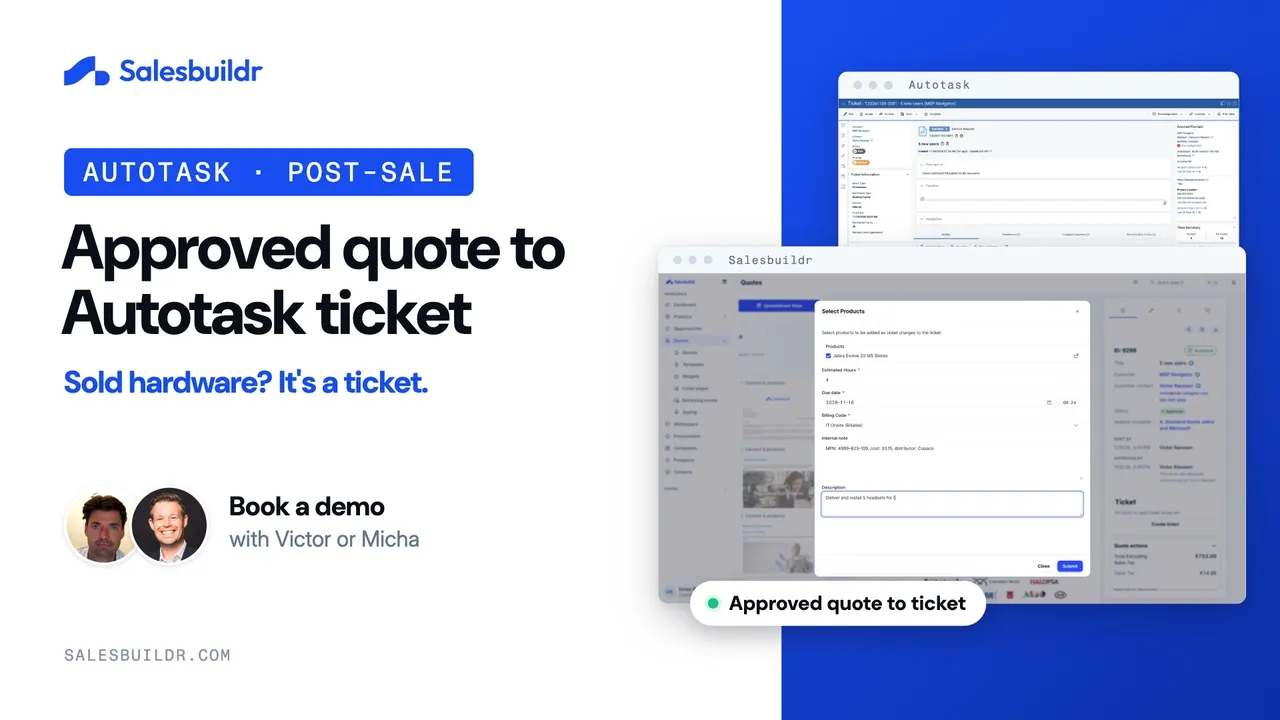
From approved quote to Autotask ticket
1:03
Every quote in Salesbuildr starts from your Autotask catalog and a saved template, so nobody rebuilds a document or a spreadsheet for each customer.
You set the cover page, layout, widgets and wording once in the template library, and every seller inherits them.
Accepted quotes update the Autotask opportunity and quote, with every line visible in Autotask. From the approved quote you click Create ticket. With procurement on, placing the distributor order creates the purchase order in Autotask.
Prices come from your catalog, pricing books and distributor feeds, and approval rules can stop a quote before it goes out with the wrong discount or margin.
Onboarding is where we connect Autotask, import your catalog and build your first templates with you. Most MSPs are fully live and quoting in Salesbuildr within 2 to 4 weeks of kickoff. If it does not work for you, the 30-day money-back guarantee applies, and so does the 30-day ROI guarantee.
Salesbuildr imports your catalog, keeps your services and labour in Autotask and can run next to your current tool until your team has moved over.
See the side by side comparisonWhat moves between Salesbuildr and Autotask, in which direction, and when.
| What | Direction | When |
|---|---|---|
| Companies and contacts | Both ways | Changes in Autotask arrive in real time through webhooks, usually within 1 to 2 minutes. |
| Opportunities | Both ways | Changes in Salesbuildr go to Autotask straight away. Autotask has no opportunity webhooks, so changes made there are picked up every 10 minutes. |
| Opportunity custom fields (UDFs) | Salesbuildr → Autotask | With the opportunity. Multi-select fields are not supported. |
| Products, services and labour roles | From Autotask; new Salesbuildr products are created in Autotask | Services and labour always come from Autotask, with labour roles mapped to categories. New products are created in Autotask. |
| Accepted quotes | Salesbuildr → Autotask | When the client accepts, the Autotask opportunity and quote update. The Autotask quote is created as you work and updated on acceptance, with every line item and the signed PDF attached. From the approved quote you click Create ticket. With procurement on, placing the distributor order creates the purchase order in Autotask. |
| Recurring service contracts | Salesbuildr → Autotask | When you choose: create a recurring service contract, or add services to an existing contract. |
| Contracts and recurring services | From Autotask | Read for whitespace analysis (Advanced plan and up). |
| Inventory | From Autotask | For the inventory locations you enable. |
Every line, recurring or one-time, is visible on the Autotask quote. From Salesbuildr you can create a recurring service contract in Autotask, or add services to an existing contract.
Every product category needs an Autotask billing code. Product edits or inactivations made in Autotask need a manual sync from Salesbuildr.
With Synchronize to Autotask on, later edits to linked products go back as well.
Set sales tax and VAT at the product-type level, and get low-stock alerts.
Link user logins to Autotask contacts by email address, for automatic authentication and access control.
Autotask Service Bundles don’t sync, so rebuild them as Salesbuildr bundles.
If a record fails to sync, it shows up under Settings → Tools → Issues, where you can fix the cause and retry.
See which customers are missing which services, and which contracts are up for renewal, based on your Autotask Recurring Service contracts. Whitespace is on the Advanced plan and up.
See which customers are missing which services.
Compare what each customer already has with the services you sell, before you quote.
See which contracts are up for renewal, and when they expire.
Leading MSPs across Europe trust Salesbuildr to transform their sales processes on top of Autotask.


A mature UK MSP built 12 to 15 templates covering 90% of its business and eliminated Autotask sync errors overnight.
Read case study
A large Irish MSP on Autotask cut proposal time from half a day to a couple of minutes with Salesbuildr.
Read case studyA large Dutch MSP with a complex portfolio, including telecom from KPN, runs quoting on Autotask through Salesbuildr.
Autotask is the dominant PSA in the Netherlands and Belgium, the large majority of Salesbuildr’s Dutch and Belgian MSP customers run their service desk on Autotask, which is why two-way Autotask sync is the most battle-tested integration in the platform.
Most MSPs are fully live and quoting within 2 to 4 weeks of kickoff. See how onboarding works.
Plans, users and onboarding fees are on the pricing page. See pricing.
Storefront is a paid add-on on the Premium plan.
Common questions about the Salesbuildr Autotask integration, quoting, and proposals.
Salesbuildr connects to Autotask PSA with a two-way sync. Companies, contacts and opportunities sync both ways, your products, services and labour roles come from Autotask, and when a client accepts, the Autotask opportunity and quote update. The Autotask quote is created as you work and updated on acceptance, with every line item and the signed PDF attached. You can also create recurring service contracts, or add services to an existing contract, from Salesbuildr. From the approved quote you click Create ticket. With procurement on, placing the distributor order creates the purchase order in Autotask.
Company and contact changes in Autotask arrive in real time through webhooks, usually within 1 to 2 minutes. Opportunity changes made in Salesbuildr go to Autotask straight away. Autotask has no opportunity webhooks, so changes made there are picked up every 10 minutes.
When the client accepts, the Autotask opportunity and quote update. The Autotask quote is created as you work and updated on acceptance, with every line item and the signed PDF attached. From Salesbuildr you can create a recurring service contract in Autotask, or add services to an existing contract. From the approved quote you click Create ticket. With procurement on, placing the distributor order creates the purchase order in Autotask.
Services and labour always come from Autotask, with labour roles mapped to categories. New products are created in Autotask. Every product category needs an Autotask billing code. With Synchronize to Autotask on, later edits to linked products go back as well. For hardware, we recommend quoting from your distributor feeds.
From the approved quote you click Create ticket. With procurement on, placing the distributor order creates the purchase order in Autotask.
The Whitespace Selling Module that analyzes Autotask contracts for service gaps is included from the Advanced plan and up. Two-way Autotask PSA sync for quoting, contacts, and tickets is included from the Standard plan.
New products are created in Autotask. Every product category needs an Autotask billing code.
Want the step-by-step version? Read how to automate MSP sales workflows in Autotask, with three workflow templates.
Have another question? Email us or book a demo and we’ll get back to you within one business day.
Salesbuildr also integrates natively with ConnectWise and Halo. Connect your distributor network through Pax8 or browse our full global distributor catalog.
Book a demo to see a quote from your Autotask catalog, and the Create ticket step after the client accepts.
Book a demo